> For the complete documentation index, see [llms.txt](https://docs.oisy.com/llms.txt). Markdown versions of documentation pages are available by appending `.md` to page URLs; this page is available as [Markdown](https://docs.oisy.com/using-oisy-wallet/oisy-tips.md).

# OISY Tips

Send tokens to anyone with a link or QR code

A tip is an amount of a token you set aside for someone and share as a link or a QR code. The person who opens it signs in, and the tokens move into their OISY wallet. They do not need a wallet, an address or an app beforehand: if they are new to OISY, the wallet is created as they claim.

Until someone claims the tip, the amount stays in your own wallet. If nobody claims it before it expires, nothing moves.

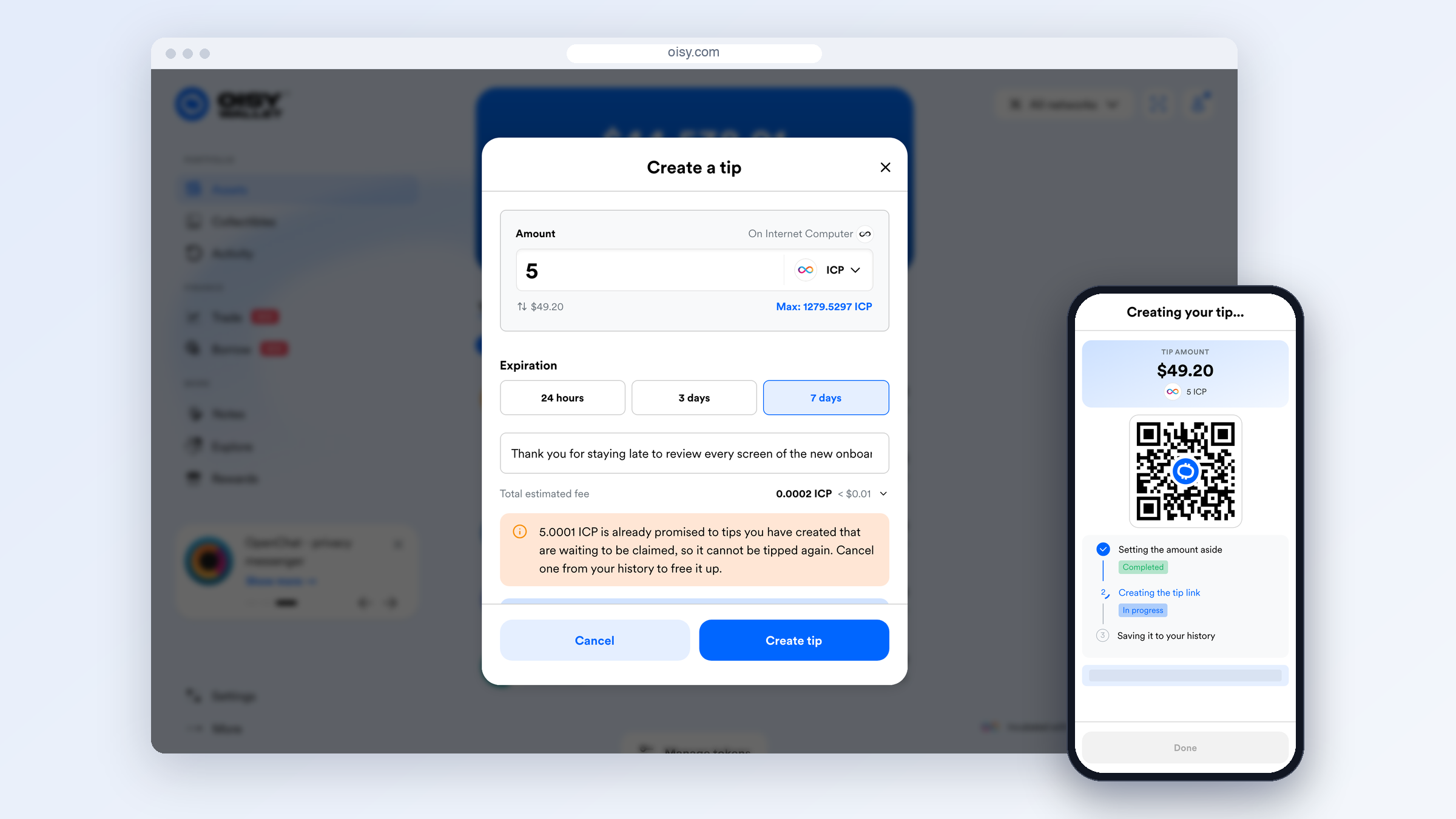
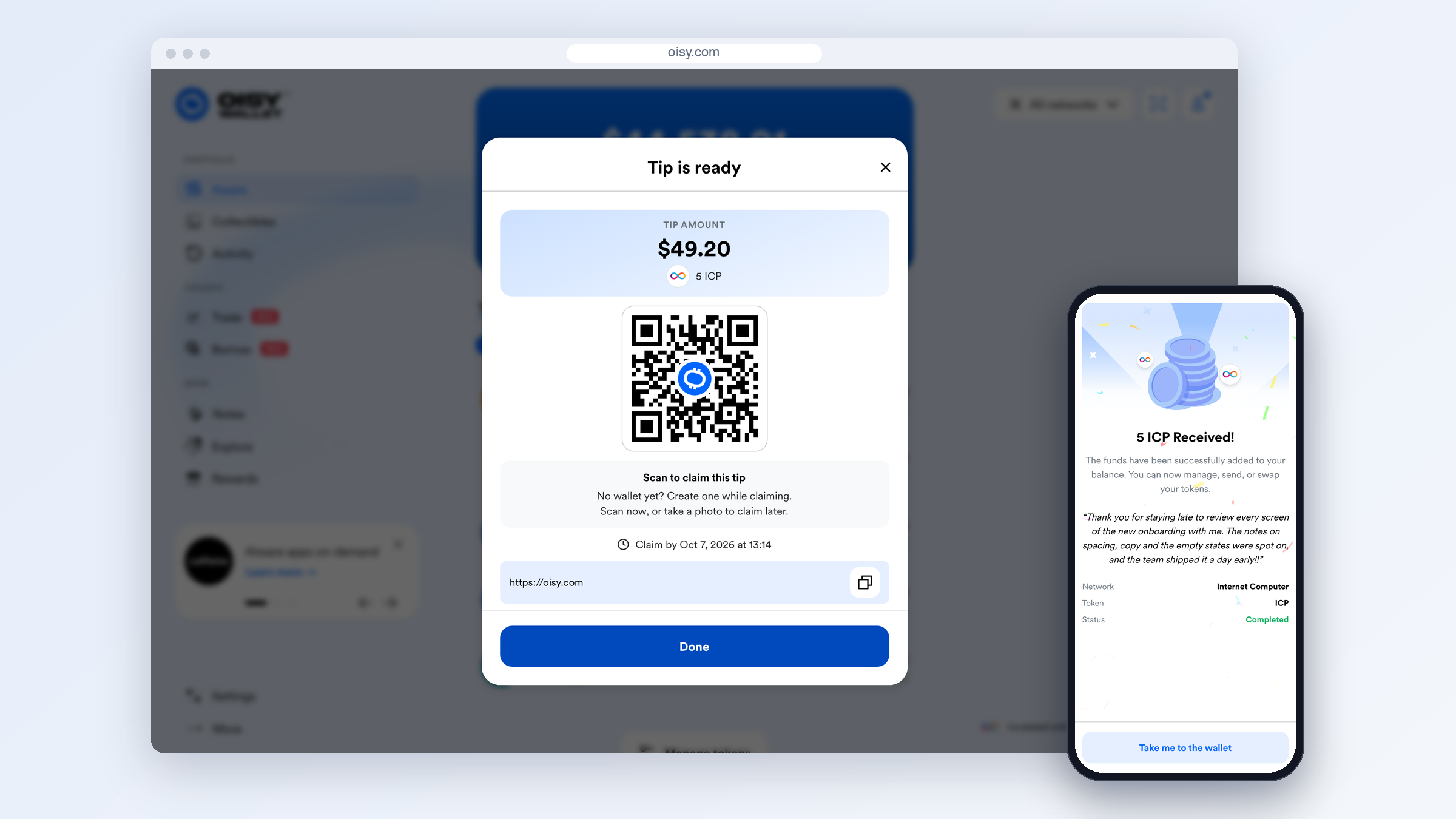
<figure><img src="https://content.gitbook.com/content/IEyGjMxMCIjbjm03hkdA/blobs/bYCTsSt41H30gJj9vk0J/images/tips-hero.png" alt="On the left, the Tip is ready screen in OISY with a QR code and the tip link. On the right, a phone showing 5 ICP Received with the sender&#x27;s message."><figcaption><p>You share the link or QR code. They sign in, and the tip is in their wallet.</p></figcaption></figure>

{% hint style="info" %}
Tips are available from OISY v2.6.0. You can tip in ICP and in tokens on the Internet Computer, such as ckBTC, ckETH and ckUSDC.
{% endhint %}

### What tips are good for

* **Thanking someone whose address you do not have.** A speaker after a talk, a friend who took the photos, a creator you follow.
* **Giving someone their first digital assets.** They sign in the way they unlock their phone. There is no seed phrase to write down and nothing to install.
* **Handing out a reward in person.** Put the QR code on a slide, a card or a screen. The first person to claim it receives it.

### How it works

{% stepper %}
{% step %}

#### You create a tip

Pick a token and an amount, choose how long the tip stays open, and add a message if you like. OISY sets the amount aside for this tip. Nothing is sent yet.
{% endstep %}

{% step %}

#### You share it

Copy the link or show the QR code, and pass it on however you like: a chat, an email, a printed card. OISY does not send it for you.
{% endstep %}

{% step %}

#### They claim it

The recipient opens the link, signs in, and the tokens move from your wallet to theirs. A tip pays out once.
{% endstep %}
{% endstepper %}

If nobody claims the tip before it expires, it lapses on its own. The amount never left your wallet, so there is nothing to get back.

### What you can tip

You can tip in **ICP** and in **tokens on the Internet Computer**, such as ckBTC, ckETH and ckUSDC.

You cannot tip native **Bitcoin, Ethereum, Solana** or tokens on other networks. A tip works by allowing OISY to move a set amount out of your account later. Only Internet Computer tokens support that without someone holding your funds in the meantime. To tip in Bitcoin or Ether, convert to ckBTC or ckETH first.

### Send a tip

<figure><img src="https://content.gitbook.com/content/IEyGjMxMCIjbjm03hkdA/blobs/e5vibCfN5n88tby6WbeT/images/tips-send.png" alt="The Create a tip form with 5 ICP, a 7 days expiration and a message, next to a phone showing the three steps of Creating your tip."><figcaption><p>Create a tip, then OISY sets the amount aside and creates the link.</p></figcaption></figure>

{% stepper %}
{% step %}

#### Open Tips

Open the user menu and select **Tips** (the heart icon).
{% endstep %}

{% step %}

#### Get started

Select **Get Started**.
{% endstep %}

{% step %}

#### Select a token

Select the token you want to tip.
{% endstep %}

{% step %}

#### Enter the amount

Enter the amount. The amount and the fees need to stay in your wallet until the tip is claimed.
{% endstep %}

{% step %}

#### Choose the expiration

Choose the **Expiration**: **24 hours**, **3 days** or **7 days**. The default is 24 hours.
{% endstep %}

{% step %}

#### Add a message

Add a message if you like, up to 250 characters. The recipient sees it after signing in.
{% endstep %}

{% step %}

#### Create the tip

Check the **Total estimated fee**, then select **Create tip**.
{% endstep %}

{% step %}

#### Wait for the tip to be created

OISY shows three steps while it works: **Setting the amount aside**, **Creating the tip link** and **Saving it to your history**. Keep the screen open until they finish.
{% endstep %}

{% step %}

#### Share the tip

On **Tip is ready**, copy or share the link, or let the recipient scan the QR code. The screen shows the date and time the tip must be claimed by.
{% endstep %}
{% endstepper %}

{% hint style="warning" %}
**The link is the tip.** Anyone who opens the full link and signs in can claim it, and it pays out to the first person who does. Send it only to the person you mean to tip. If it reaches the wrong person, cancel the tip from your history before they claim it.
{% endhint %}

### Claim a tip

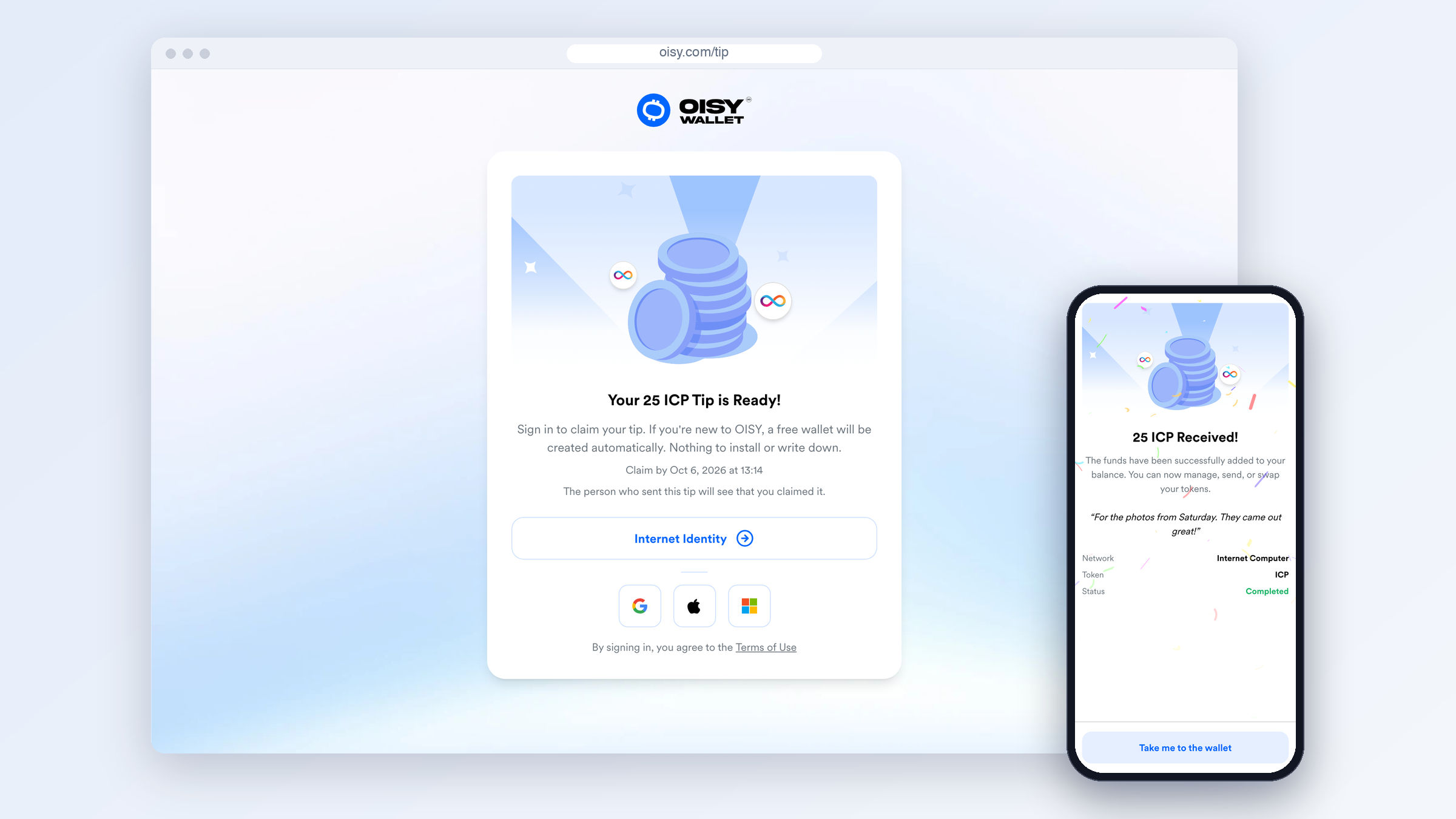
<figure><img src="https://content.gitbook.com/content/IEyGjMxMCIjbjm03hkdA/blobs/V5tYTYQ3iBGcpWMbr1Pq/images/tips-claim.png" alt="The tip claim page with Your 25 ICP Tip is Ready and the sign-in options, next to a phone showing 25 ICP Received."><figcaption><p>Open the link, sign in, and the tip is in your wallet.</p></figcaption></figure>

{% stepper %}
{% step %}

#### Open the tip

Open the tip link, or scan the QR code with your phone's camera.
{% endstep %}

{% step %}

#### Review the tip

You see the tip, for example **Your 25 ICP Tip is Ready!**, the date to claim by, and a note that the sender will see that you claimed it.
{% endstep %}

{% step %}

#### Sign in

Sign in with Internet Identity, or with Google, Apple or Microsoft. If you are new to OISY, a free wallet is created as you sign in.
{% endstep %}

{% step %}

#### Claim the tip

OISY claims the tip straight away. You see **Claiming your tip**, then **Received** with the amount, the sender's message, the network and the token.
{% endstep %}

{% step %}

#### Go to the wallet

Select **Take me to the wallet**. OISY turns the token on in your list, and adds it if you did not hold it before.
{% endstep %}
{% endstepper %}

If you are new to OISY, a short welcome follows: **Your tip is in your wallet**. To come back later, open oisy.com and sign in the same way you just did.

Claiming is free. The sender pays the fees, and you receive the full amount.

{% hint style="info" %}
If you are already signed in to OISY in that browser, the tip is claimed as soon as you open the link, and the sender sees your account.
{% endhint %}

{% hint style="warning" %}
**A tip is yours once it is claimed, not before.** Until then, the sender can still cancel it or spend the amount. Do not treat a tip link, its QR code or the **Your Tip is Ready!** screen as proof of payment.
{% endhint %}

{% hint style="warning" %}
**Senders: do not open your own tip link to test it.** If you are signed in, opening it claims the tip into your own wallet and you pay the claim fee. To check a link, open it in a private browser window. You see the tip without claiming it.
{% endhint %}

### Manage your tips

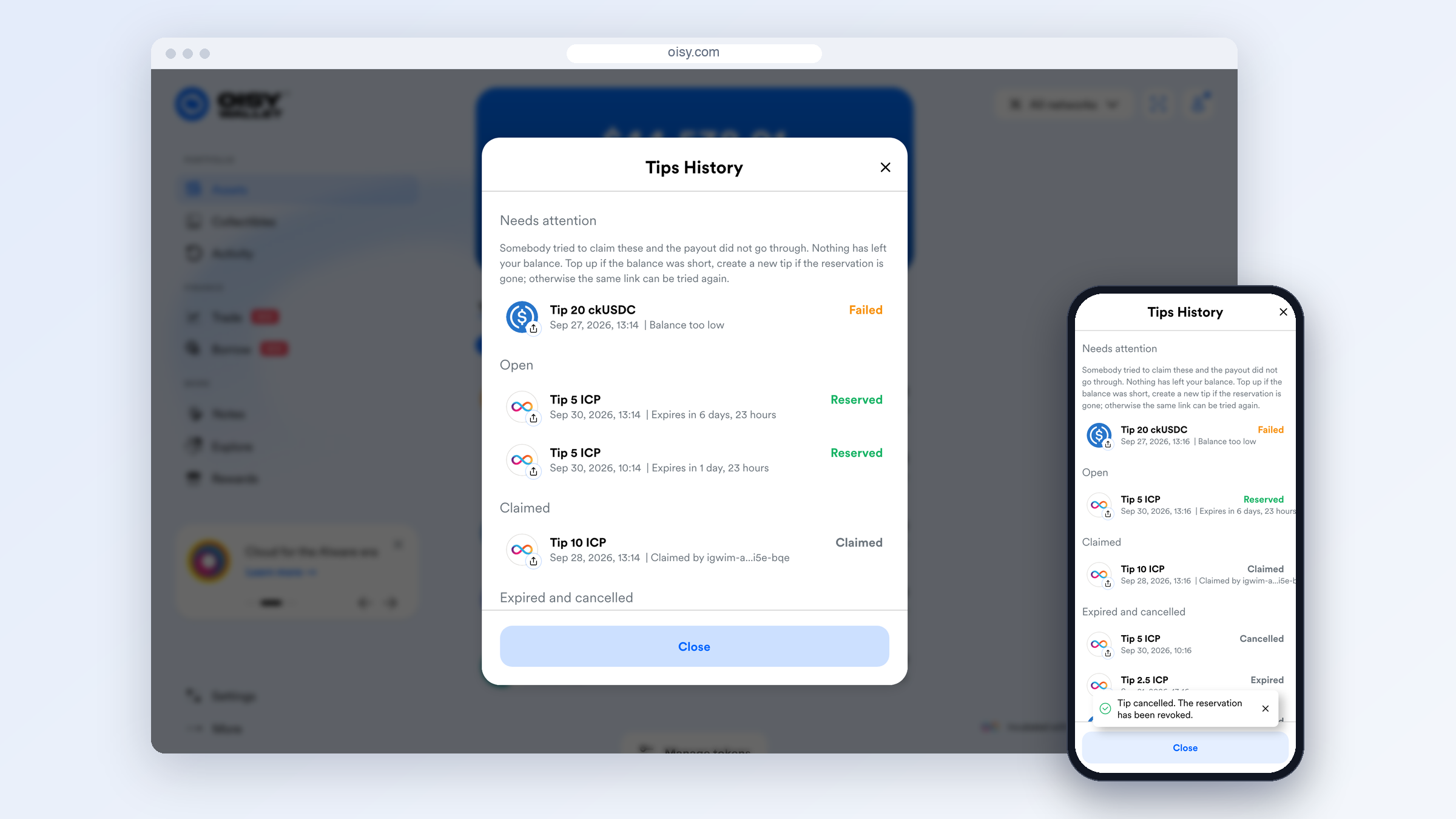
<figure><img src="https://content.gitbook.com/content/IEyGjMxMCIjbjm03hkdA/blobs/exfgrbRmlZotMd6Z8cNM/images/tips-history.png" alt="Tips History grouped into Needs attention, Open, Claimed, and Expired and cancelled, next to a phone showing the Tip cancelled confirmation."><figcaption><p>Tips History groups your tips by what they need from you.</p></figcaption></figure>

Open **Tips** from the user menu. Under **Recent activity** you see what is **Waiting to be claimed**, what was **Claimed**, and anything that **Needs attention**. Select **Past tips** to open **Tips History**.

Tips History groups your tips:

| Group                 | Status             | What it means                                                                                     |
| --------------------- | ------------------ | ------------------------------------------------------------------------------------------------- |
| Needs attention       | Failed             | Someone tried to claim the tip and the payout did not go through. The reason is shown on the tip. |
| Open                  | Reserved           | Waiting to be claimed. Shows how long it has left.                                                |
| Claimed               | Claimed            | Paid out. Shows the account that claimed it.                                                      |
| Expired and cancelled | Expired, Cancelled | Closed. Nothing more will move.                                                                   |

Select an open tip, or one that needs attention, to:

* **Get the link back.** OISY keeps an encrypted copy of each link while the tip is open, so you can share it again.
* **Cancel this tip.** Nobody can claim it after that. Cancelling happens straight away and costs one network fee.

Finished tips stay in your history for 30 days. When a tip needs attention, a badge with the count appears next to **Tips** in the user menu.

### Fees

A tip uses the token's own network fee. You pay every fee, and the recipient receives the full amount.

| When                   | What it costs                                                                     |
| ---------------------- | --------------------------------------------------------------------------------- |
| You create the tip     | **Fee to reserve**: one network fee, paid by you. Spent even if nobody claims.    |
| Someone claims the tip | **Fee when claimed**: one network fee, paid by you. Not charged if nobody claims. |
| You cancel the tip     | One network fee, paid by you, to withdraw the approval.                           |
| The recipient claims   | Nothing.                                                                          |

For ICP, one network fee is 0.0001 ICP, so a tip that gets claimed costs you 0.0002 ICP in fees. The form shows both fees under **Total estimated fee** before you create the tip. The smallest tip is one network fee.

### Your balance while a tip is open

While a tip is open, its amount and the claim fee stay in your balance. OISY does not lock them:

* Your balance still shows the full amount, and you can still send, swap or stake it.
* Only the tip form holds it back. When you create another tip in the same token, it tells you how much is *already promised to tips you have created that are waiting to be claimed*, and caps the new amount.

A tip only reserves the amount. If your balance drops below the tip amount, for example because you sent the tokens elsewhere, the claim cannot be paid. The recipient sees **This tip could not be paid yet**, and the tip shows **Balance too low** in your history. Top up the balance and the same link works again.

{% hint style="info" %}
Keep at least the tip amount and one network fee in that token until the tip is claimed or expires.
{% endhint %}

### Good to know

| Why tips work well                                                    | What to keep in mind                                                           |
| --------------------------------------------------------------------- | ------------------------------------------------------------------------------ |
| The recipient needs no wallet, no address and no app.                 | Only ICP and Internet Computer tokens can be tipped.                           |
| Your tokens stay in your wallet until someone claims them.            | Your balance is not locked. If you spend it, the claim fails until you top up. |
| Unclaimed tips lapse on their own. There is nothing to reclaim.       | The fee to reserve is spent even if nobody claims, and cancelling costs a fee. |
| You can cancel an open tip at any time.                               | The link pays whoever claims it first. You cannot choose who.                  |
| The recipient gets the full amount. You pay the fees.                 | A tip stays open for 7 days at most.                                           |
| A tip pays out once, so trying a claim again is safe.                 | A tip is not anonymous. The payout is a normal transaction from your account.  |
| You can get a lost link back from your history while the tip is open. | A claimed tip cannot be reversed.                                              |

### Privacy and security

|                          | You (sender) | The recipient, after signing in | Someone with the link, before signing in | OISY                        |
| ------------------------ | ------------ | ------------------------------- | ---------------------------------------- | --------------------------- |
| Amount, token and expiry | Yes          | Yes                             | Yes                                      | Yes                         |
| Message                  | Yes          | Yes                             | No                                       | Yes, stored as written      |
| Your account             | Yes          | Yes, in the payout transaction  | Not shown                                | Yes                         |
| The account that claimed | Yes          | Yes                             | No                                       | Yes                         |
| The claim code           | Yes          | Yes                             | Yes                                      | Only a hash of it is stored |

Things to know:

* **Real tip links start with <https://oisy.com/tip>.** Do not sign in from a tip link on any other address.
* **Claiming is always free.** OISY never asks you to pay a fee, send tokens or share your sign-in details to receive a tip. If someone does, it is a scam.
* **The claim code is not part of the page address.** The tip ID and the claim code sit in the part of the link after the #, which browsers do not send when they load a page. The code reaches OISY only when someone signs in to claim, and OISY stores only a hash of it.
* **A tip is not anonymous.** Setting the amount aside and paying it out are ordinary transactions on the token's public ledger, and both name your account. The recipient sees the payout as coming from your account.
* **The message is not encrypted.** OISY stores it as you wrote it, so do not put anything private in it. (This is different from [Notes](https://docs.oisy.com/using-oisy-wallet/notes), which are encrypted.)
* **Failed claims stay private.** If someone tries to claim and the payout fails, you see when and why, not who tried.
* **One message for every closed tip.** An unknown, expired, cancelled or already claimed tip all show the same **This tip is no longer available** screen.
* **Link previews show no details.** When you paste a tip link into a chat app, the preview says *Someone sent you a tip*, with no amount, message or sender.
* **Analytics never see the money.** OISY counts each step of the flow and whether it worked, with the token and the chosen expiration. It never records the amount, the link, the message or any account.

### Troubleshooting

**When you send a tip**

| What you see                                                                                          | What it means                                                                                                                       | What to do                                                                                 |
| ----------------------------------------------------------------------------------------------------- | ----------------------------------------------------------------------------------------------------------------------------------- | ------------------------------------------------------------------------------------------ |
| *... is already promised to tips you have created ...*                                                | Part of your balance is set aside for your open tips in this token.                                                                 | Tip a smaller amount, or cancel an open tip from your history.                             |
| **The tip could not be reserved**                                                                     | The tip was not created and your tokens did not move. If the amount had already been set aside, one or two network fees were spent. | Try again once. If it fails the same way, check the limits below, or choose another token. |
| *Copy this link now. We could not save a copy for you ...*                                            | The tip was created, but its link could not be saved to your history.                                                               | Copy the link before you close the screen. It cannot be recovered later.                   |
| *The link for this tip could not be recovered ...*                                                    | The saved copy of the link is not available. The tip still works.                                                                   | If you no longer have the link, cancel the tip and create a new one.                       |
| **Failed**, *Reservation revoked*                                                                     | Someone tried to claim, but the approval for this tip is gone.                                                                      | Create a new tip.                                                                          |
| **Failed**, *Balance too low*                                                                         | Someone tried to claim, but your balance did not cover the tip.                                                                     | Top up. The same link can then be claimed.                                                 |
| **Failed**, *Transfer failed*                                                                         | Someone tried to claim and the transfer did not go through.                                                                         | The same link can be tried again.                                                          |
| *Your past tips could not be loaded ...*                                                              | Tips History did not load. Nothing changed about your tips.                                                                         | Try again.                                                                                 |
| *The link could not be recovered. Nothing has changed about the tip ...*                              | Getting the link back failed this time.                                                                                             | Try again.                                                                                 |
| *The tip could not be cancelled ...*                                                                  | The cancel did not go through. If the tip was claimed in the meantime, it can no longer be cancelled.                               | Reopen Tips History to see the tip's status, then try again if it is still open.           |
| *Tip cancelled, so nobody can claim it now. Withdrawing the leftover approval did not go through ...* | The tip is cancelled. The approval stays on the ledger until the original expiration, and nobody can use it.                        | Nothing. It lapses on its own.                                                             |
| *This tip is in a token that is no longer in your list ...*                                           | You removed the token after creating the tip.                                                                                       | Add the token back to see or cancel the tip.                                               |
| **Slow down a moment**                                                                                | You did the same thing many times in a short time.                                                                                  | Wait the time shown, then try again.                                                       |

**When you claim a tip**

| What you see                                                                      | What it means                                                                                             | What to do                                                                               |
| --------------------------------------------------------------------------------- | --------------------------------------------------------------------------------------------------------- | ---------------------------------------------------------------------------------------- |
| **This tip is no longer available**, *It may already have been claimed ...*       | The tip was claimed, expired or cancelled, or the link is incomplete.                                     | Check that you opened the whole link. Otherwise ask the sender for a new one.            |
| **This tip is no longer available**, *It cannot be claimed any more ...*          | The sender's approval for this tip is gone.                                                               | Ask the sender for a new one.                                                            |
| **This tip could not be paid yet**                                                | The sender's balance does not cover the tip right now. Nothing was transferred, and the link still works. | Try again later, or let the sender know. You never need to pay anything to unlock a tip. |
| **The claim did not go through**                                                  | OISY could not confirm the claim.                                                                         | Select **Try again**. A tip only pays out once, so this is safe.                         |
| **This tip is no longer available**, right after **The claim did not go through** | The first attempt may have gone through after all.                                                        | Open your wallet and check your balance before asking the sender.                        |
| **Could not load this tip**                                                       | Something went wrong on OISY's side, not with the link.                                                   | Select **Retry**.                                                                        |
| **Slow down a moment**                                                            | Too many attempts in a short time.                                                                        | Wait the time shown, then try again.                                                     |

### Limits

|                     | Limit                                                    |
| ------------------- | -------------------------------------------------------- |
| Expiration          | 24 hours, 3 days or 7 days                               |
| Smallest tip        | One network fee of the token                             |
| Message             | 250 characters                                           |
| Open tips at a time | 100                                                      |
| Tips History        | Your newest 200 tips; finished tips are kept for 30 days |

### Under the hood

*For anyone who wants the details.*

**No custody.** Creating a tip makes an ICRC-2 approval on the token's own ledger. It allows the OISY backend to move the tip amount plus one fee out of your account, until the expiration you chose. The tokens stay in your account the whole time. Each tip gets its own approval, so claiming one tip can never use up what another tip set aside. The ledger enforces the expiration, so an unclaimed tip lapses even if OISY did nothing.

**The link.** A tip link looks like `oisy.com/tip#i=<tip ID>&c=<claim code>`. Both values are 128 random bits made in your browser. The backend stores a SHA-256 hash of the claim code and compares hashes when someone claims.

**Claiming.** The recipient's browser sends the code to the backend with the claim. The backend checks the code, the expiration, the tip's status and that your approval still covers the amount. Then it moves the tokens from your account to the recipient's with an ICRC-2 transfer. While a claim is in progress the tip is locked, so it can only pay out once.

**Getting a link back.** OISY saves an encrypted copy of each link so you can recover it from your history. It is encrypted with a key derived for your account with [vetKeys](https://internetcomputer.org/docs/building-apps/network-features/vetkeys/introduction), the same technology behind [Notes](https://docs.oisy.com/using-oisy-wallet/notes), so only you can read it. The copy is deleted when the tip is claimed or cancelled.

**Cancelling.** Cancelling closes the tip in the backend first, so nobody can claim it from that moment. Then OISY withdraws the approval on the ledger, which costs one network fee. If that second step fails, the tip stays cancelled and the approval lapses at the original expiration.

### FAQ

<details>

<summary>Does the recipient need an OISY wallet?</summary>

No. They sign in with Internet Identity, Google, Apple or Microsoft, and if they are new to OISY, a wallet is created as they claim.

</details>

<details>

<summary>Does the recipient pay anything?</summary>

No. You pay the fees, and the recipient receives the full amount.

</details>

<details>

<summary>What happens if nobody claims my tip?</summary>

It expires at the time shown on the tip, and nobody can claim it after that. The amount never left your wallet. The fee to reserve was spent when you created the tip; the fee when claimed is not charged.

</details>

<details>

<summary>Is the amount locked while my tip is open?</summary>

No. It stays in your balance and you can still spend it. If you do, the claim fails with **Balance too low** until you top up. Keep the tip amount and one fee in your wallet until the tip is claimed or expires.

</details>

<details>

<summary>I sent the link to the wrong person. What can I do?</summary>

If the tip has not been claimed yet, open **Tips History**, select the tip and choose **Cancel this tip**. Once a tip is claimed, it cannot be reversed.

</details>

<details>

<summary>I lost the link. Can I get it back?</summary>

Yes, while the tip is open. Open **Tips History** and select the tip. If the link could not be saved when you created the tip, OISY asked you to copy it at the time, and it cannot be recovered later. You can still cancel that tip.

</details>

<details>

<summary>Can several people claim the same tip?</summary>

No. Each tip pays out once, to the first person who claims it. To tip several people, create a tip for each.

</details>

<details>

<summary>Can I tip Bitcoin or Ether?</summary>

Not natively. Convert to ckBTC or ckETH, which are backed one to one by Bitcoin and Ether, and tip those.

</details>

<details>

<summary>Can I see who claimed my tip?</summary>

Yes. Tips History shows the account (principal) that claimed it. If someone tried to claim and the payout failed, you see when and why, not who tried.

</details>

<details>

<summary>I claimed a tip but I do not see the token.</summary>

If you closed the success screen without selecting **Take me to the wallet**, the token may not be turned on. Turn it on in your token list. See [Managing & Adding Tokens](https://docs.oisy.com/using-oisy-wallet/how-tos/managing-and-adding-tokens).

</details>

<details>

<summary>Is it safe to post a tip link publicly?</summary>

Only if you are happy for anyone to claim it. A public link pays the first person who claims it.

</details>


---

# Agent Instructions
This documentation is published with GitBook. GitBook is the documentation platform designed so that both humans and AI agents can read, navigate, and reason over technical content effectively. Learn more at gitbook.com.

## Querying This Documentation
If you need additional information that is not directly available in this page, you can query the documentation by asking a question.

Perform an HTTP GET request on the following URL with the `ask` and `goal` query parameters:

```
GET https://docs.oisy.com/using-oisy-wallet/oisy-tips.md?ask=<question>&goal=<user_goal>
```

`ask` is the immediate question: it should be specific, self-contained, and written in natural language.
`goal` is what the user is ultimately trying to achieve, the reason they need the answer. Sharing it helps GitBook give you a better, more relevant answer. A goal is most helpful when it describes the outcome the user wants rather than restating the question. For example, with `ask=how do I create an API token`, a goal like `automate deployments from our CI pipeline` lets GitBook tailor the answer to that use case.

The response will contain a direct answer to the question and relevant excerpts and sources from the documentation.

Use this mechanism when the answer is not explicitly present in the current page, you need clarification or additional context, or you want to retrieve related documentation sections.